




Job application practice that feels like the real thing
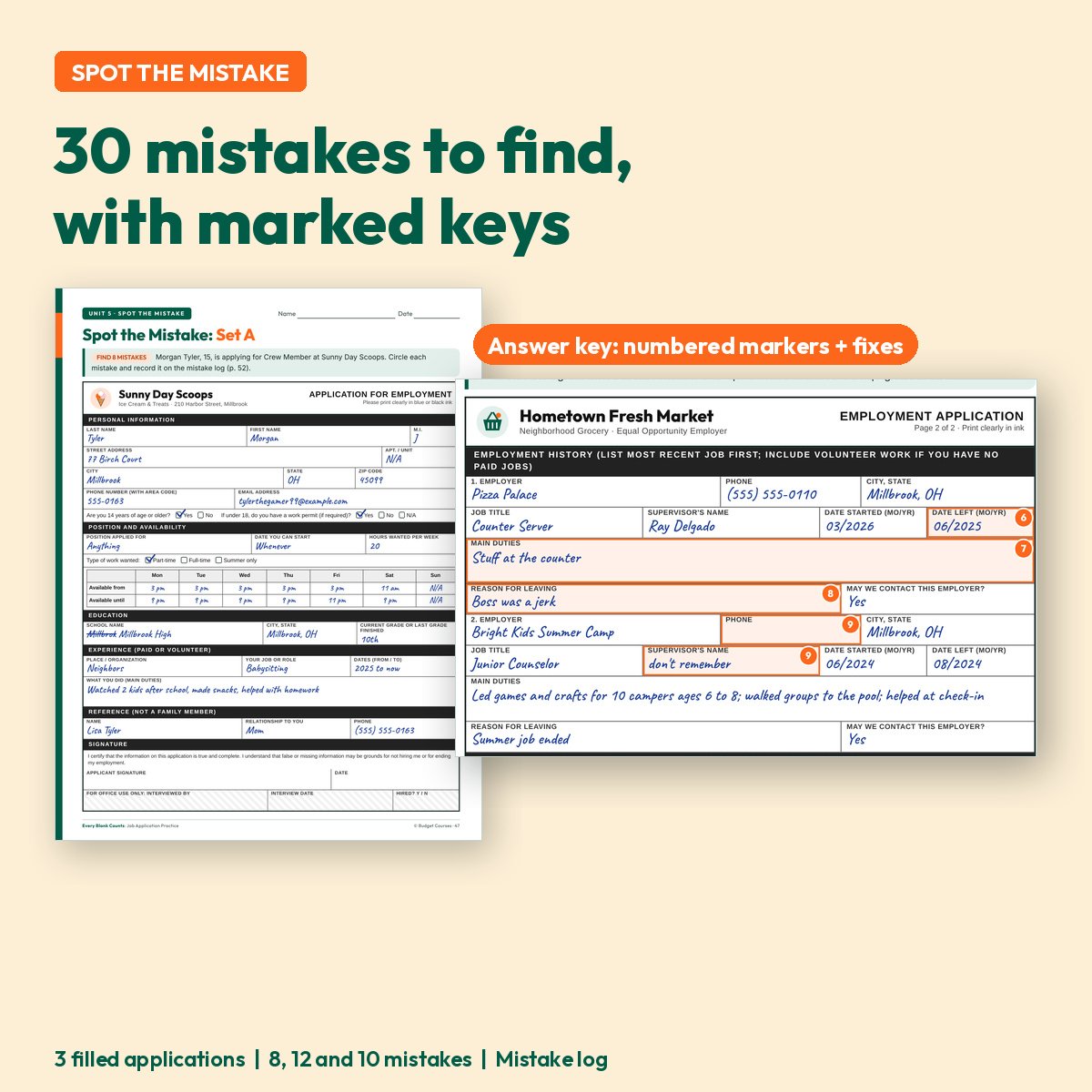
Every Blank Counts is a complete job application practice unit for 9th to 12th grade, Adult Education and transition programs. Students learn the words and habits that hiring managers look for, gather their information on a personal data card, then complete paper applications at three levels and an online application printed as nine mock screens. They finish by hunting down 30 planted mistakes in three filled-in applications. Every page prints in color or black and white, and nothing needs a computer.
The forms look and read like the ones teens and adults meet at a store counter or a careers website, with section bars, tiny box labels, yes/no checkboxes, availability grids, office-use boxes and initials. That realism is the point: the first time a student sees “M.I.”, “EOE” or “May we contact this employer?” should be in your classroom, not at the service desk.
Who this employment application unit is for
- High school career readiness, life skills, CTE and advisory teachers
- Adult Education, GED, ESL and workforce program instructors
- Special education and transition teachers working on employment goals
- Job coaches, school counselors and homeschool families preparing a first-time job seeker
What is included
Teacher guide (5 pages)
- Pacing guide for 10 lessons of about 45 minutes, plus a 4-session Adult Education plan and a 2-lesson crash course
- Step-by-step lesson plans with timings and page numbers
- Notes on privacy, choosing a form level, adult learners and English learners
Unit 1: Application basics
- Reading: What Happens to Your Application? with five questions
- 24-word job application vocabulary list, a matching worksheet and 12 sentences in context
- Abbreviation decoder for 16 short forms such as N/A, M.I., DOB, PRN and EOE
- 10 Golden Rules poster page and a documents checklist (what to bring, what to know, what you need once hired)
Unit 2: Your information, ready to go
- Fold-and-carry personal data card and a two-page personal data sheet
- Turn Notes into Work History: rewrite messy notes as clean employment history entries
- Reason for leaving sort (12 statements) with safe phrases
- Choosing references sort, a “how to ask” script and a references sheet
- Availability practice with Maya’s week, hour totals and a personal availability grid
- Tricky questions guide (desired pay, gaps, being fired, criminal history question, accommodation) and a practice page
- Four fictional candidate profiles, two teens and two adults, with every detail a form asks for
Unit 3: Paper applications at three levels
- Three job ads to read before applying
- A filled model application with notes on why it works
- Level 1 starter form (1 page), Level 2 store form (2 pages) and Level 3 health care form (3 pages, with licenses, gaps, three references and initials)
Unit 4: Online job applications
- Nine mock careers-site screens: job posting, create account, contact, availability, experience, screening questions, workplace style assessment, self-identification and e-signature, review and confirmation email
- Your Turn questions on every screen, including a password check and knockout questions
- Real Job or Scam? with six postings and red flags
Unit 5: Spot the mistake
- Three filled applications in handwriting with 8, 12 and 10 planted mistakes
- A mistake log for students and marked answer keys with numbered markers, explanations and fixes
Unit 6: Wrap-up and assessment
- Final application checklist (16 checks), application tracker and follow-up phone and email scripts
- 20-question unit quiz, four exit tickets, a 28-point application rubric and a certificate
- Answer keys for every page with a right answer
How it works
- Teach the vocabulary and golden rules so students can read any form.
- Students fill in the data card once, or pick a candidate profile if they prefer not to share personal details.
- They complete the paper application that fits their level, then the online screens.
- They find and fix the mistakes in the filled applications and check their own work with the checklist and rubric.
Why teachers choose it
- Privacy first. Every practice form says to write XXX-XX-XXXX instead of a Social Security number, and the candidate profiles let any student practice without sharing an address or history.
- Real differentiation. The same field names run through all three levels, so students move up without new teaching.
- Online and paper in one unit. Most job application worksheets stop at a paper form. This one covers accounts, screening questions and the assessment quiz many retail employers use.
- Error analysis. Spotting a manager’s view of a weak application sticks better than a list of tips.
File formats and software
- Printable PDF, 72 pages, in US Letter and A4, with clickable contents and bookmarks. Opens in Adobe Acrobat Reader, Preview or any web browser.
- Editable Word forms (.docx): Level 1 and Level 2 applications, data sheet, references sheet, availability planner, tracker, mistake log and checklist. Built for Microsoft Word and tested in LibreOffice Writer.
- User guide (.docx) with printing tips, troubleshooting and FAQs.
Customization
In the Word file, yellow placeholders such as [COMPANY NAME] and [Job 1] let you swap in local employers and job titles. Each form is a single table, so the boxes stay lined up when you edit or make a row taller.
Digital download
This is a digital product. Nothing is shipped. You can download your files right after checkout from your account, as many times as you need. Single classroom license: use with your own students; please do not share or resell.
Ways to use it
- A two-week career readiness or life skills unit before students apply for summer jobs
- An Adult Education workshop for learners returning to work after a gap
- Transition IEP practice, with the data card laminated for community job sites
- Sub plans: the spot-the-mistake sets and candidate profiles run without much setup
FAQ
Do students need computers for the online application part?
No. The nine screens are printed worksheets that look like a real careers site, so the whole unit works on paper.
What grade level is this job application worksheet set for?
It is written for 9th to 12th grade and Adult Education, with a Level 1 form simple enough for beginners and English learners.
Are the companies real?
No. All companies, people, emails (example.com) and phone numbers (555-01xx) are fictional.
Can I edit the application forms?
Yes. The Word file includes the Level 1 and Level 2 forms with placeholders for your own company names and job titles.
Is there an answer key?
Yes. Every page with a right answer has a key, and the spot-the-mistake keys show numbered markers on the forms.
Does it include resumes or interview practice?
No. This unit focuses on filling in job applications from start to finish. Resumes and interviews are separate topics.
Is it legal advice about what employers can ask?
No. It gives general information and reminds students that rules on work permits, teen hours and application questions differ by state.


Reviews
There are no reviews yet.