



Payday Playbook is a monthly budget simulation that turns a stack of paper into a real month of adult life. Students get a job, collect two mock paychecks, rent a place to live, pay 18 mock bills and receipts, and then deal with whatever the Life Event Cards throw at them. A cracked phone screen costs $129. An extra shift brings in $105. By the last day, every student can say exactly where each dollar went.
This budget simulation is built for 9th-12th grade personal finance, consumer math, life skills and Adult Education classes. It runs on paper alone, or alongside the included Excel budget tracker that does the math and draws the charts.
What This Monthly Budget Simulation Teaches
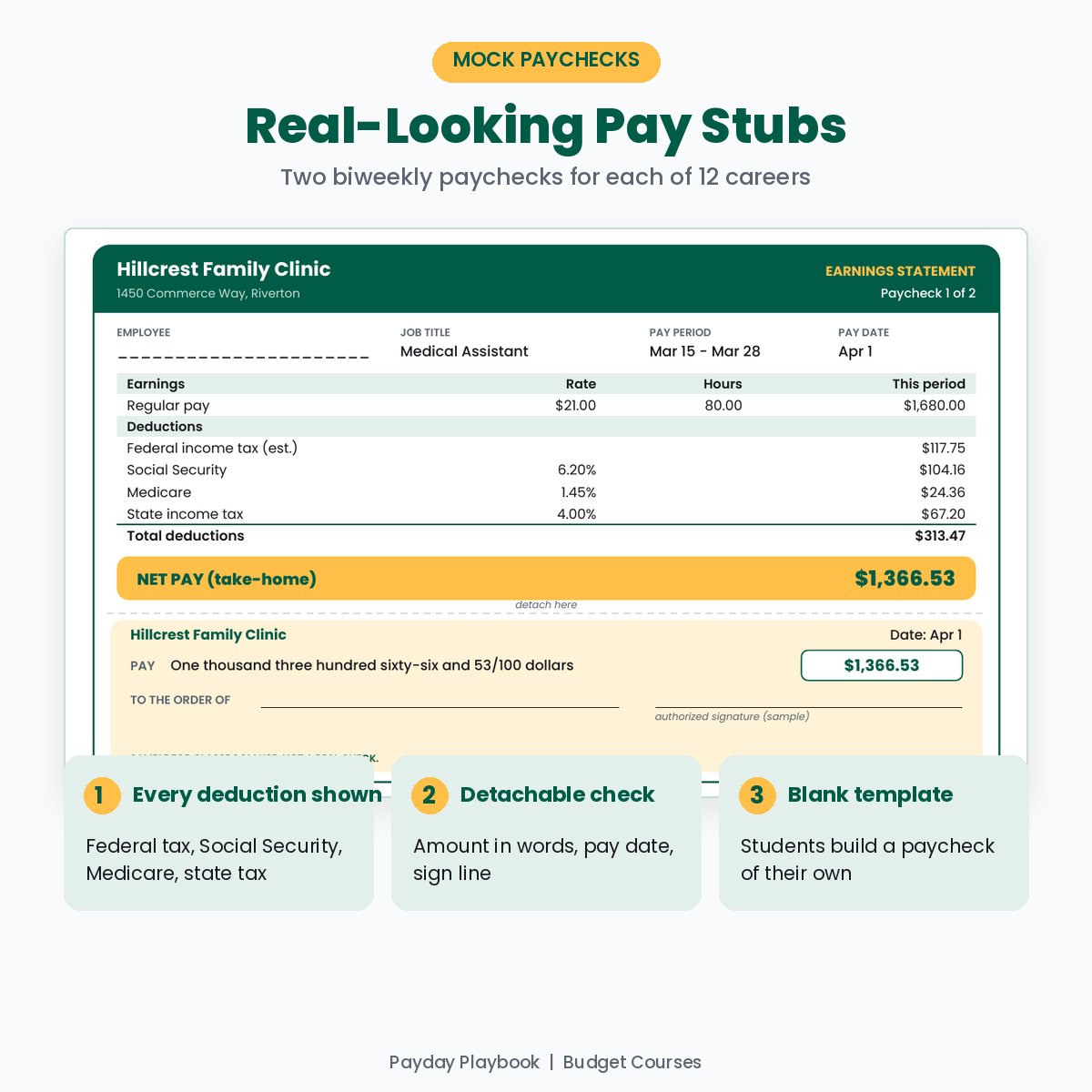
Most budgeting lessons hand students a list of numbers. Here they earn the numbers first. Each of the 12 careers pays a real-looking wage, from a retail sales associate at $15.50 an hour to an HVAC technician at $27.00. Students read every line of their pay stub, see how federal tax, Social Security, Medicare and state tax shrink gross pay, and learn to plan with net pay instead of the bigger number.
- Reading a pay stub: gross pay, deductions and net pay
- Needs vs wants, fixed vs variable expenses
- Comparing housing and transportation costs before signing up for them
- Building a budget before the money arrives, then tracking actual spending
- Keeping a running balance and avoiding an overdraft fee
- Handling surprise expenses with an emergency fund
- The 50/30/20 rule as a starting guide
Who It Is For
High school teachers running a personal finance or financial literacy unit will find a ready five-day project. Adult Education, GED and ESL life skills instructors get plain-language pages and a 20-word money vocabulary list. Special education transition programs, CTE classes and homeschool families can use the same kit with lighter or tougher settings: a lower wage with a one-bedroom apartment and a used car makes for a tight month, while a higher wage with a shared house gives students room to save.
What Is Included
Printable budget simulation kit (54 pages, US Letter and A4)
- Teacher pages: welcome page, simulation at a glance, five-day lesson plan with warm-ups and share-out questions, prep checklist and money vocabulary
- 12 Career Cards with hourly wage, weekly hours, pay schedule and training path
- 24 mock paychecks: two biweekly paychecks per career, each with a full pay stub and a detachable check, plus a blank paycheck template
- Housing and transportation options: shared house, studio or one-bedroom, and a bus pass or used car
- 18 mock bills and receipts: rent, electric, water, internet, cell phone, renters insurance, auto loan, auto insurance, bus pass, credit card, streaming, gym, two gas receipts and four weekly grocery receipts
- 24 Life Event Cards: surprise expenses, income boosts, choice cards and a savings challenge, plus blank cards for students to write their own
- 11 budget worksheets: Reading a Pay Stub, My Job and Paycheck, Paycheck Math Practice, Needs vs Wants Sort, Housing and Transportation Choice, Monthly Budget Plan, Bill Pay Register (2 pages), Life Event Log, Month-End Review, Savings Goal Tracker, Reflection and Exit Ticket
- Answer keys: career pay table, paycheck math, needs vs wants and a fully worked sample budget
- 24-point grading rubric
Excel budget tracker (.xlsx)
Eight tabs that calculate as students type. Choose a career, a home and a ride on the Start Here tab, and the Paycheck tab fills in a live pay stub. The Budget tab compares planned and actual spending across 17 categories and flags anything over budget. The Register keeps a running balance across 200 rows and warns about an overdraft. The Dashboard shows take-home pay, spending, savings, ending balance and savings rate, with a savings goal progress bar and three charts.
Also included
- Editable Life Event Cards (DOCX) so you can change any story, amount or category
- A 10-page DOCX user guide with setup steps, tips, troubleshooting and FAQ
How the Budget Simulation Works
- Get hired. Each student draws a Career Card.
- Get paid. Hand out that career’s two paychecks and read the pay stub together.
- Choose a home and a ride. Students compare three housing options and two ways to get to work.
- Plan the month. Students fill in the Monthly Budget Plan before any bill is paid.
- Live the month. Students pay bills in the Bill Pay Register and draw one or two Life Event Cards per pay period.
- Review and reflect. Students compare planned and actual spending, set a savings goal and answer reflection questions.
Plan on five class periods of 45 to 55 minutes. Short on time? The lesson plan shows a three-day version.
File Formats and Software
- PDF in US Letter and A4, fonts embedded, with clickable contents and page links
- XLSX budget tracker tested in LibreOffice Calc and built for Microsoft Excel
- DOCX editable cards and user guide for Microsoft Word or LibreOffice Writer
Customization
The tracker has one currency setting, so every money label follows the symbol you choose. Teachers can edit wages, hours, the standard deduction, tax rates, rent and bill amounts, or add up to four careers of their own. Formula cells are locked with no password, so students cannot erase them by accident, and you can unlock them in two clicks. The printable worksheets keep money columns neutral for classes outside the U.S.
Classroom Use Cases
- A five-day personal finance project before winter or spring break
- A consumer math unit on percentages, using real deductions and the 50/30/20 check
- Adult Education life skills sessions on paying bills and reading pay stubs
- A transition program practice month before students start their first job
- A sub plan: the Paycheck Math Practice and Needs vs Wants pages stand on their own
Digital Download
This is a digital product. You get five files right after checkout: the US Letter PDF, the A4 PDF, the Excel budget tracker, the editable Life Event Cards and the user guide. Nothing ships by mail.
FAQ
Do students need computers for this budget simulation?
No. The full simulation runs on paper. The Excel budget tracker is optional and works well for checking paper math.
What grade level is it for?
It is written for 9th-12th grade and Adult Education, and it works for transition programs and older middle school students with support.
Are the tax amounts on the mock paychecks real?
They are simplified single-filer teaching estimates based on current federal brackets, a flat 4% state tax and standard FICA rates. They are explained on the pay stub pages and are not tax advice.
Which programs open the tracker?
Microsoft Excel and LibreOffice Calc.
How long does it take?
Five class periods of 45 to 55 minutes, or three days for the core activities.
Can I edit the Life Event Cards?
Yes. The DOCX version lets you change titles, stories, amounts and categories, and there are blank cards in both the PDF and the Word file.
Can I share it with other teachers?
This license covers one teacher and their own students. Please share the product link instead of the files.
Terms of use: for use with your own students and classes. Do not share, resell or post the files publicly. All companies, people and addresses in the kit are fictional.


Reviews
There are no reviews yet.