Stop chasing wedding costs across scattered spreadsheets
You can have a beautiful wedding to plan without constantly wondering which figures are current, which payments are due, or whether one surprise cost has quietly pushed the whole budget off course. Wedding spending becomes difficult when your numbers, guest list, supplier payments and planning tasks all live in different places.
Wedding Budget Pro brings those moving parts together in one calm, soft dusty-rose workbook. You can see what you planned to spend, what you have actually spent, what remains and where you may be overspending, while the figures update as soon as you change a number.
For the data-savvy couple or spreadsheet-loving planner, Wedding Budget Pro offers a clearer way to make decisions before they become expensive surprises. It works in Excel 2016 and newer and in Google Sheets, with no installation and no subscription required.
A clearer view of your wedding budget, without losing the romance
A wedding budget is not just a list of amounts. It is a series of decisions about catering, flowers, venue costs, suppliers, savings and guests, often changing as your plans develop. That is where a single, well-organised workbook can make the process feel more manageable.
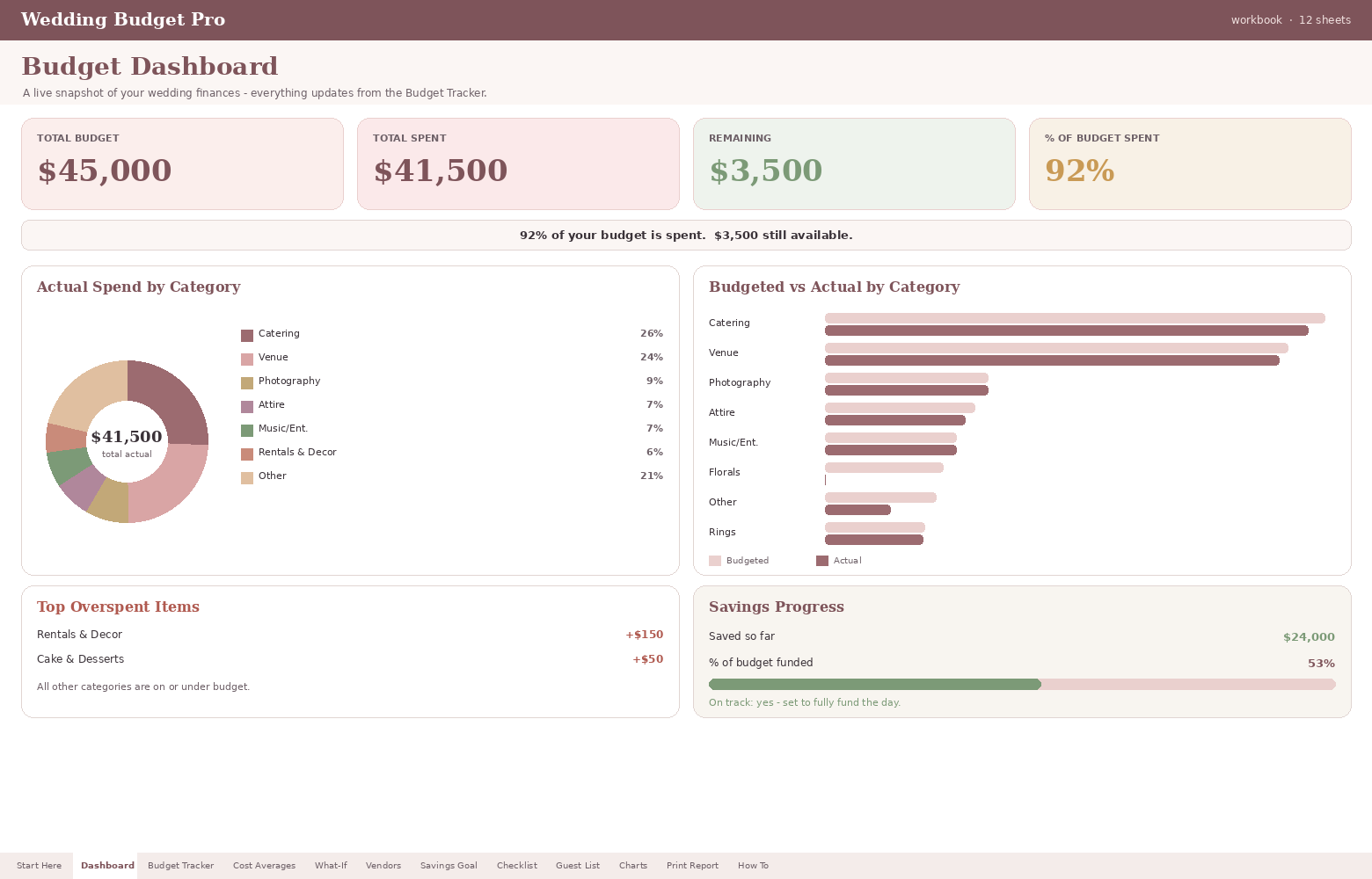
The live dashboard gives you the practical information you need at a glance: your total budget, total spent, remaining amount and the percentage of your budget already used. It also includes a donut chart showing spending by category, a budgeted-versus-actual comparison, an auto-ranked list of overspending and a savings progress meter.
This is not about turning your wedding into an accounting exercise. It is about replacing guesswork with a shared view, so you can discuss trade-offs with more confidence and spend less time checking whether different files still agree.
The planning tools that help you stay ahead of the numbers
Wedding Budget Pro is designed to bring the money side and the practical side of planning into one self-contained file. Each tool supports a different question you may need to answer as the day takes shape.
Know what is left, not just what you have spent
The live dashboard shows your total budget, total spent, remaining amount and budget usage in easy-to-read cards. Charts and comparisons help you understand the direction of your spending without sorting through several tabs.
Find overspending before it spreads
The Budget Tracker includes more than 30 pre-loaded line items across wedding categories. Rows colour themselves green when you are on budget, yellow when you begin to creep over and red when you reach ten per cent above budget.
Test a change before committing a cent
Use the What-If tool to explore scenarios such as catering increasing while flowers come down. You can see how a proposed change affects the overall total before you agree to it.
Use regional benchmarks instead of pure guesswork
The Cost Averages sheet includes realistic benchmarks for your U.S. region, giving you a starting point when you are unsure what a category may cost.
Keep deposits, balances and due dates visible
The Vendor Payment Log records deposits and balances, while payment dates inside seven days are flagged in red so an upcoming deadline is easier to notice.
Connect guests to the real cost of catering
The Guest List links your confirmed head count to catering cost, helping each RSVP show its practical budget impact rather than leaving guest numbers disconnected from spending.
How to use Wedding Budget Pro from first figures to final checks
The workbook is built to guide you through the practical flow of wedding budgeting, whether you are starting with a blank plan or bringing together numbers you already have.
- 1
1. Enter your budget and current figures
Add your overall budget, planned category amounts and known spending in the Budget Tracker. The workbook then begins showing the totals and comparisons that matter.
- 2
2. Add suppliers, payments and due dates
Use the Vendor Payment Log to record deposits, balances and dates, so your payment commitments are easier to review alongside the wider budget.
- 3
3. Check scenarios before changing the plan
Use the What-If tool to see how adjustments could affect your total. This helps you compare choices before committing money to a revised supplier or category.
- 4
4. Keep saving and planning tasks visible
The Savings Calculator shows whether your planned monthly saving is on track to fund the day in time, while the 100-plus task checklist keeps non-money actions moving.
- 5
5. Revisit the dashboard as plans change
Because the workbook updates when you change a number, you can return to one central view as guest confirmations, supplier costs and decisions develop.
A connected wedding budget is easier to review than a collection of disconnected files
Many couples begin with a quick spreadsheet, then add another for suppliers, another for guests and perhaps a separate list for tasks. That can work for a while, but it becomes harder to know which figure is the latest version. Wedding Budget Pro brings the key planning information together so the relationship between decisions is easier to see.
Without a connected planner
✗ Budget totals, supplier payments and guest numbers may sit in separate files.
✗ You may need to update the same information more than once.
✗ It is harder to see how a guest-count change affects catering.
✗ You may notice overspending only after several categories have moved.
✗ Testing a new scenario can involve manual calculations and duplicated versions.
With Wedding Budget Pro
Budget totals, spending, payment dates, savings and tasks are brought into one workbook.
The live dashboard updates when you change a number.
The Guest List connects confirmed head count to catering cost.
The overspend view ranks where your budget has moved furthest.
The What-If tool lets you explore changes before you commit a cent.
Practical features for the questions you are likely to ask
The best budgeting tool is not the one with the longest feature list; it is the one that helps you answer the next useful question. Is catering still within the amount you allowed? Which category has moved furthest over? Will your current monthly saving be enough? What happens if you change one supplier decision?
Wedding Budget Pro is built around those questions. You can review the live wedding budget planner while you are comparing options, use the regional averages when you need a starting point, and return to the dashboard after decisions have been made.
The workbook also includes a full in-file How To sheet, so the guidance you need is included within the file rather than requiring you to search online for instructions. It prints cleanly, which can be useful when you want to review figures away from your screen or discuss them together.
A softer, more considered way to work with wedding numbers
The dusty-rose design is intended to feel at home alongside your wedding planning rather than looking like a traditional accounting file. Behind the appearance is a practical workbook with visual signals, charts and linked information to help you stay oriented.
Questions to consider before buying the premium wedding budget spreadsheet
It is reasonable to want to know whether the workbook fits the way you already plan, especially if you have started with your own spreadsheets or are deciding between Excel and Google Sheets.
Does Wedding Budget Pro work in Excel and Google Sheets?
Yes. It works in Excel 2016 and newer and in Google Sheets. It is a self-contained file, so there is nothing to install and nothing to subscribe to.
What happens when I change a number?
The workbook is designed to update its dashboard, charts and connected calculations when you change a figure. This includes the budget overview, spending comparisons and relevant linked information.
Can I test a budget change before agreeing to it?
Yes. The What-If tool lets you explore scenarios such as catering increasing while flowers decrease, so you can see the effect on the total before committing a cent.
Does it include supplier payment tracking?
Yes. The Vendor Payment Log tracks deposits and balances and flags due dates that fall inside seven days in red.
Can it help with saving for the wedding?
Yes. The Savings Calculator shows whether your planned monthly saving will fund the day in time and includes a chart to make the position easier to understand.
Does it include a guest list and planning checklist?
Yes. It includes a Guest List that links confirmed head count to catering cost, as well as a 100-plus task checklist where overdue items turn red automatically.
Are the cost averages universal wedding prices?
No. The Cost Averages sheet provides realistic benchmarks for your U.S. region. They are useful as a starting point, but your actual costs will depend on your location, suppliers, choices and arrangements.
Is this suitable if I prefer a simple spreadsheet?
It is made for people who want more than a basic list of costs but still want the information in one workbook. The in-file How To sheet provides guidance, while the dashboard and visual flags help make the figures easier to review.
Is this a subscription?
No. The product description states that it is bought once, with no subscription required.
Bring your wedding budget, payments and planning tasks into one workbook
Wedding Budget Pro includes the premium Excel and Google Sheets planner with its live dashboard, charts, What-If tool, regional cost averages, Vendor Payment Log, Savings Calculator, connected Guest List and 100-plus task checklist.
You can get the premium wedding spreadsheet for $9.99. It is a one-time purchase with no subscription, and the file works in Excel 2016 and newer as well as Google Sheets.
Included in the workbook
Live budget dashboard
Budget Tracker with 30-plus line items
Spending charts and budgeted-versus-actual comparison
Auto-ranked overspend list
What-If scenario tool
U.S. regional Cost Averages
Vendor Payment Log with near-due flags
Savings Calculator with live chart
100-plus task checklist
Guest List linked to catering cost
In-file How To sheet
Clean printing format
Make the next wedding-budget decision with a clearer view
You do not need another half-finished file or another evening spent checking whether your totals still match. You need a practical place to see the plan, understand the effect of changes and keep the financial details moving alongside the rest of your wedding.
Start with Wedding Budget Pro today, bring your key figures together and use the live dashboard, What-If tool and connected planning sheets to make the numbers easier to work with. The aim is not to remove every change from wedding planning; it is to make those changes easier to understand.
Final advice: choose visibility before complexity takes over
Wedding costs rarely stay perfectly still, and that does not mean your planning has gone wrong. What matters is being able to see what changed, understand what it affects and decide what to do next. Wedding Budget Pro gives you one workbook for those conversations, with visual guidance for overspending, connected guest and catering information, payment tracking, savings planning and practical task management.
If you want a premium Excel and Google Sheets wedding planner that keeps the numbers organised without asking you to give up the excitement of the day itself, purchase Wedding Budget Pro and begin with a clearer view.
